live UPS rates at Wix checkout: How to show live UPS rates at Wix checkout
Live UPS rates at Wix checkout in four steps: install the app, choose a UPS account, add your boxes and services, and check the rates at checkout.
Live UPS rates at Wix checkout mean the shopper sees what UPS actually charges for their address and their parcel, instead of a flat guess that is either too high (and loses the sale) or too low (and costs you the difference). This guide walks through the setup with the UPS Shipping & Label Printing app for Wix.
What you need
- A Wix store.
- Optionally, your own UPS account. You can start on PoCo's UPS account with no UPS setup, or connect your own to use your negotiated rates. Your own account is required if you want to create shipments and print labels.
Step 1: Install from the Wix App Market
Install the app from its Wix App Market listing. The 10-day free trial starts when you install.
Step 2: Choose a UPS account
Pick the account the app rates with: ours, for the quickest start, or your own, for your negotiated rates. Shipments and labels are created on your own account, so connect it if you want them.
Step 3: Add your boxes and services
- Services. Switch each UPS service on or off, so shoppers only see the ones you want to offer, and pick the default they see first.
- Boxes. Shipping large or oddly shaped packages? Define your package sizes and assign products to them, and the rate reflects dimensional weight.
- Pricing. Use UPS Simple Rate for small parcels, or calculate by weight and dimensions. The choice is per store, not per order.
- Thresholds and surcharges. Set a free shipping threshold, or add an extra charge.
Step 4: Check the rates at checkout
Rates now appear at checkout for the services you switched on. Place a test order to your own address to see them.
When the order comes in
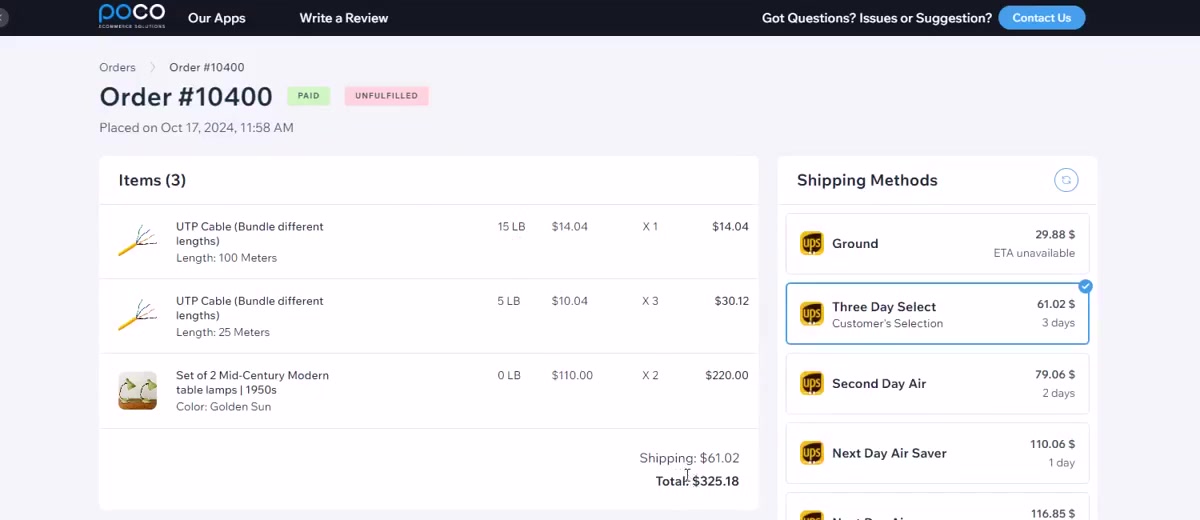
On the Shipping & Print Labels plan, open the order, pick the service, confirm the package and print the label. The label and tracking number stay with the order, so nobody retypes an address.
Shipping with FedEx or DHL too?
The same setup works in the FedEx and DHL apps for Wix. Each has its own listing and its own plan.