
 For Wix
Klaviyo for Wix: Klaviyo integration for Wix
Klaviyo Integration by PoCo offers a simple yet deep integration of your website with Klaviyo.
Free plan available. Plans from $3.99 a month.
Seamless integration with all your existing Wix contact forms
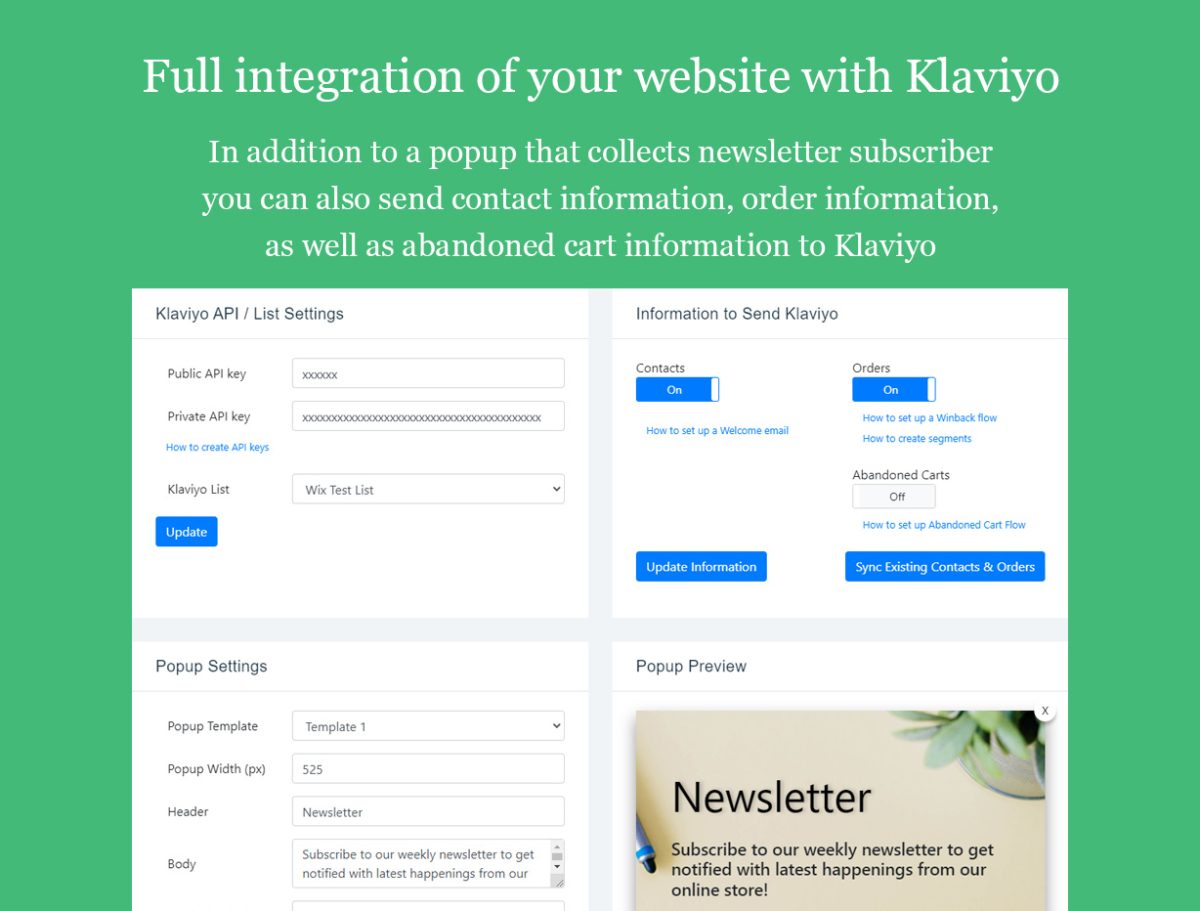
Integrates with all Wix services, including Stores, Bookings, Events, Pricing Plans, Subscriptions and more
Launch email automations like abandoned cart, welcome, and re-engage customers.
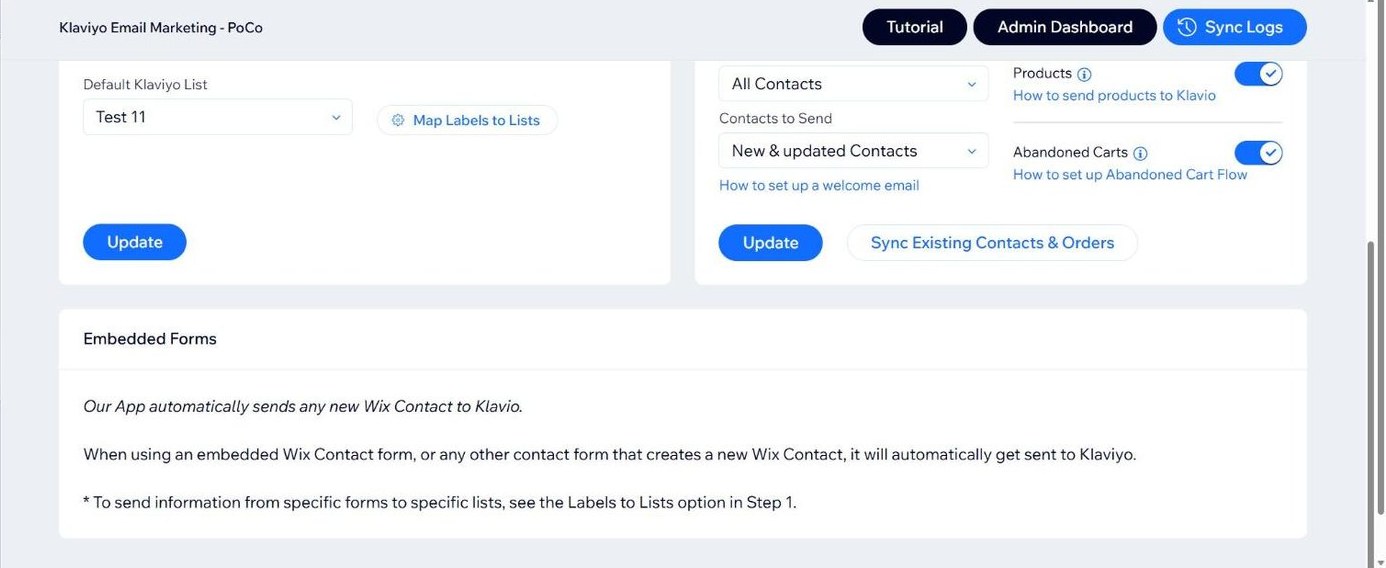
Active on Site tracking allows you to track activity and email any person who is cookied, even if they are not logged
Everything Klaviyo does
Klaviyo on real products
About Klaviyo Email Marketing - PoCo
Klaviyo Integration by PoCo offers a simple yet deep integration of your website with Klaviyo. * App requires a subscription with 3rd party service Klaviyo. Don't have an account yet? Sign up from inside the app.
Keep using your embedded Wix forms to collect newsletter subscribers from any page on your website, and sync them with the default Klaviyo List, or a specific Klaviyo List (Using Labels to List)
Sync all your existing contacts with Klaviyo, including Labels, and any other contact fields (Requires Basic plan)
Sync existing order information, as well as a live product feed with Klaviyo, to allow for advanced email segmenting, and using Klaviyo flows (Requires Advanced plan)
Sync abandoned cart information with Klaviyo, to allow you to automate abandoned email campaigns.
Active on Site tracking allows you to trigger emails to any visitor who signed up to the newsletter, or any logged in customer (when Contacts are synced).
Now sending Klaviyo order information for bookings, events, pricing plans, membership and more.
Plans
Free
Free
- Sign 100 free newsletter subscribers
- Send Klaviyo Information on 40 Orders
- Send Klaviyo Information on 40 Carts
- Use Popup & Embedded form signups
Basic
$3.99 a month
- Collect unlimited contacts
- Sync existing contacts
- Send Klaviyo information on 40 Orders
- Send Klaviyo information on 40 Carts
$3.60 a month when billed yearly.
Start free trial on WixAdvanced
$5.99 a month
- Unlimited contacts
- Sync order and cart information
$5.50 a month when billed yearly.
Start free trial on Wix“App is clean, functional, and easy-to-use.”
Prices in USD, as shown on the Wix listing on November 13, 2026. The listing has the current price.
Questions
How do I get my Klaviyo API credentials?
See our instructional video showing how to generate your Klaviyo API credentials.
What do all the options and settings in the app mean?
We have created an Instructional Video that offers an overview of all the options and settings in the app, and walks you through what they do, and how to set them to match your needs.
Still have questions? Contact us and we'll be happy to help
Do I have to use your popup?
No, you can create a popup in Klaviyo (See video below), or in Wix and use a Contact form. As long as the form creates a new Wix Contact, our app will send the information to Klaviyo
How do I create a Klaviyo popup instead of your popup?
See our instructional video showing how to create a Klaviyo popup
Why don't I see the popup?
The app sets a cookie whenever the popup is shown, and as long as the cookie is set, the popup will NOT show. To test the popup, open a new incognito (Private) mode browser and visit your website
How can I make sure emails don't go straight to the Spam folder
Mail-Tester.com is a free, user-friendly tool that allows you to test your newsletters and automated emails' current performance. It provides valuable recommendations for fixing any issues and improving your email strategy.
Using Mail Tester is simple and straightforward. Follow these easy steps to test your emails and improve your open rates:
1) Visit Mail Tester's website and copy the generated email address.
2) Send your newsletter or automated email to this address (you can add it as a Wix contact, or send a test email from a newsletter/automation to this address)
3) Return to Mail Tester's website and click "Check your score."
4) Review the detailed report, which includes recommendations for improving your email deliverability.
5) Implement the suggested changes to ensure your emails are inbox-worthy and avoid the spam folder.
6) Test again to make sure the changes / fixes worked.
How do I create a Welcome Email flow?
See our instructional video showing step-by-step how to create a welcome email flow.
* IMPORTANT NOTE *
If you do not see the default "Built-in" flows in your account as we show in this video, you will need to contact Klaviyo support (There's a live chat on their site), and say that you want the pre-built flow for custom integrations added to your account through the backend.
How do I set up an Abandoned Cart flow on Klaviyo?
See our instructional video showing step-by-step how to configure an abandoned cart flow.
* IMPORTANT NOTE *
If you do not see the default "Built-in" flows in your account as we show in this video, you will need to contact Klaviyo support (There's a live chat on their site), and say that you want the pre-built flow for custom integrations added to your account through the backend.
Can I use a Wix embedded form?
Yes, you can use any of the Wix embedded Contact forms in the website editor. Our app will automatically send those contacts to Klaviyo
How do I send specific Wix contacts to specific Klaviyo lists?
Using the Labels to Lists option in the app, you can send contacts from a specific Wix Contact form to a specific Klaviyo List with the exact same name.
See our Instructional Video
Can I use a Klaviyo embedded form?
No. Wix loads pages dynamically, and Klaviyo only supports static loading of pages. You can use a Wix embedded form to achieve the same results.
How-to videos
Related


Stuck on Klaviyo setup? Tomer or Suren answers.
Open a ticket and one of the people who built the apps replies within 24 business hours. If the automatic ticket confirmation does not arrive, check your spam folder.