
UPS shipping app for Wix: UPS shipping rates and label printing for Wix
Show real-time UPS rates at checkout, then create shipments and print labels from the order. Use our UPS account or your own negotiated rates.
10-day free trial. Plans from $5.99 a month.
Watch the walkthrough
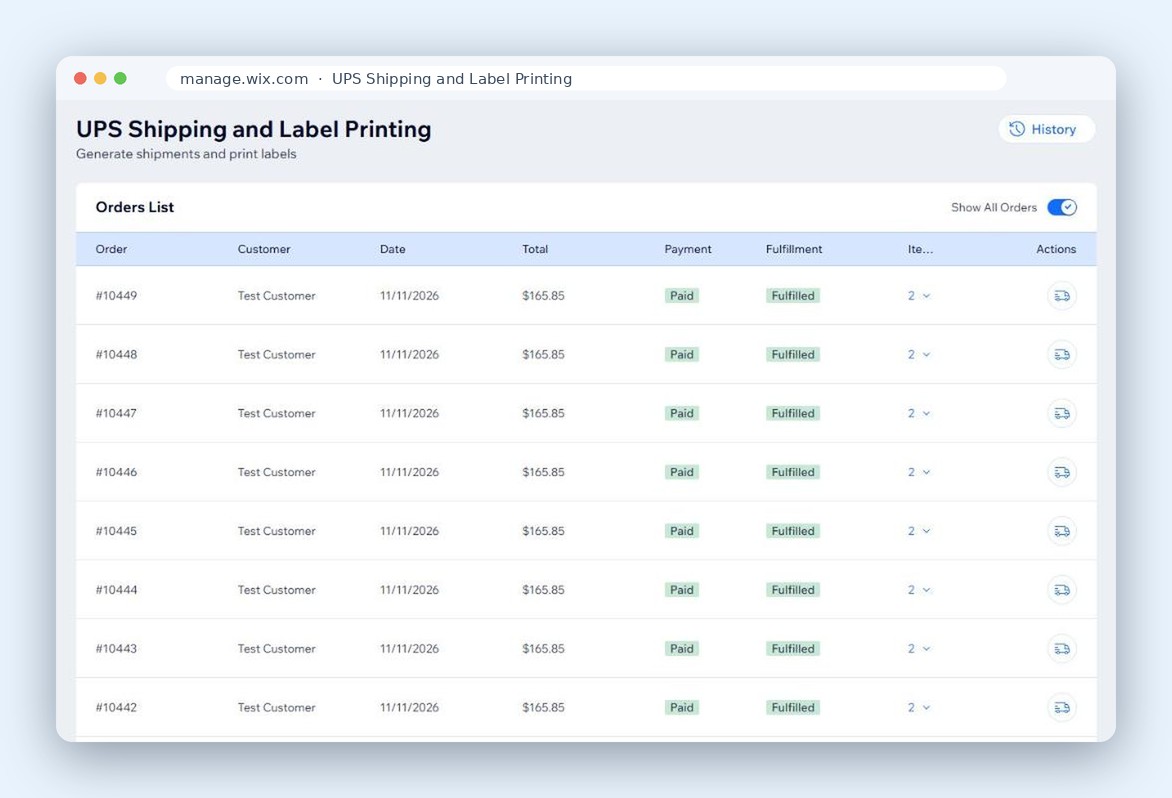
Create shipments and print labels from the order
Pick the service, confirm the package, print. The label and tracking stay with the order, so nobody retypes an address.
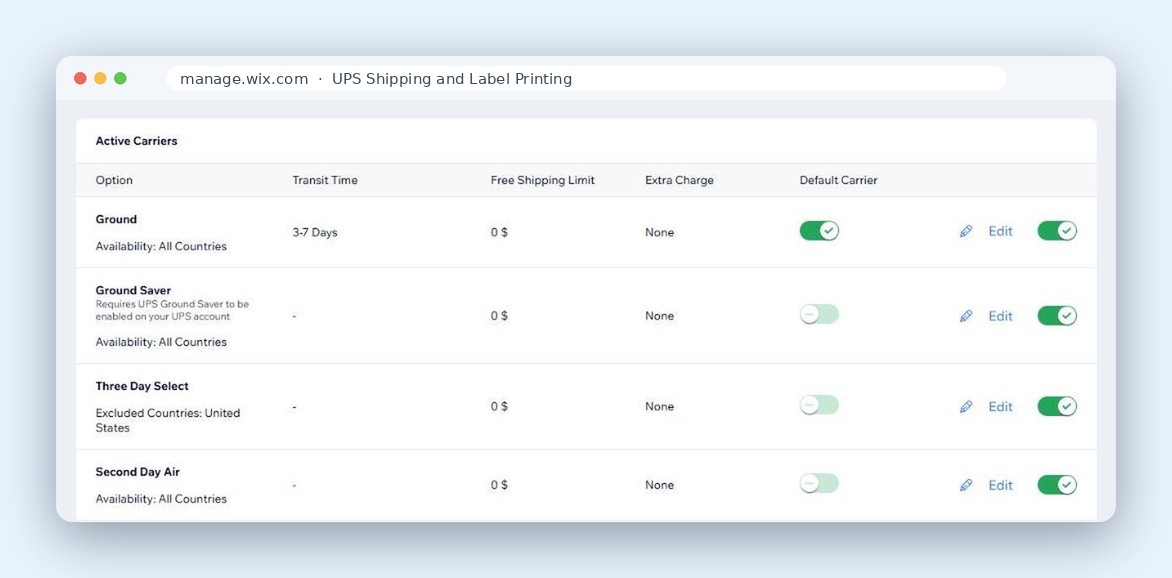
Offer only the UPS services you want
Switch each service on or off, set a free shipping threshold or an extra charge, and pick the default shoppers see first.
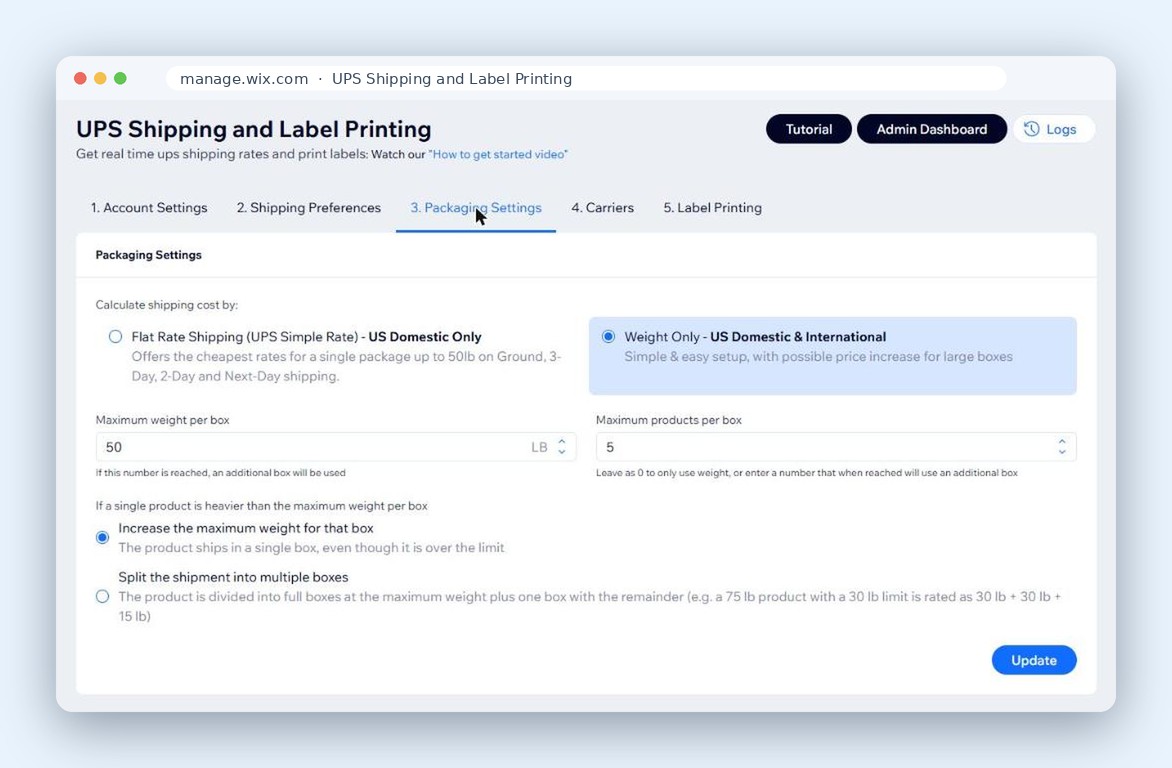
Flat rate or weight-based pricing
Use UPS Simple Rate for small parcels or calculate by weight and dimensions. Switch per store, not per order.
Everything UPS does
Save Money With Accurate Shipping Rates and Dimensional Weight
Ensure your customers get real-time, accurate UPS shipping rates, reducing cart abandonment and increasing sales.
Save Time With Easy Label Creation
Process orders with streamlined shipment creation and label printing, all from the app.
Customizable Shipping Options
Tailor your shipping settings to offer the best options for your customers, whether it's flat rate, weight-based, or product-specific.
Flexible Account Integration
Use our UPS account for quick setup, or integrate your own UPS account to access your custom negotiated rates, and to generate shipments.
Dimensional weight
Shipping large or oddly shaped packages? Define your package size and assign products to it.
UPS on real products
Good for
- Flat rate shipping
- Weight-based shipping
- Product-specific shipping
- Large or oddly shaped packages
- Your own UPS account and negotiated rates
- Shipments and labels from the order page
About UPS Shipping & Label Printing
Simplify and enhance your shipping process with the UPS Shipping & Label Printing app. Provide your customers with real-time, accurate UPS shipping rates directly in your store, reducing cart abandonment and boosting sales. Whether you choose weight-based, product-specific, or flat rate shipping, the app ensures your customers always get the best rate.
Save time on order fulfillment with our streamlined label creation and shipment management, all accessible from your shop's dashboard. Customize your shipping settings to offer only the methods that suit your business, giving you full control over how you ship.
The app integrates seamlessly with UPS, allowing you to either use our account for quick setup or connect your own UPS account to take advantage of any negotiated rates you have, ensuring cost efficiency.
Try the UPS Shipping & Label Printing app free for 10 days, and experience how it can transform your shipping process, making it easier, faster, and more reliable, all while enhancing your customers' shopping experience.
Nov 2025 Update: The app now supports dimensional weight. Shipping large or oddly shaped packages? Define your package size and assign products to it.
Set up in four steps
- 1 Install from the Wix App Market The free trial starts when you install.
- 2 Choose a UPS account Ours, or connect your own for negotiated rates.
- 3 Add your boxes and services Pick which UPS services shoppers can choose.
- 4 Rates appear at checkout Print the label when the order comes in.
Plans
Shipping Only
$5.99 a month
Real-time UPS rates at checkout.
$5.50 a month when billed yearly.
Start free trialShipping & Print Labels
$10.99 a month
Rates at checkout plus shipments and label printing.
$10.00 a month when billed yearly.
Start free trial“Setup took less than 5 minutes.”
Prices in USD, as shown on the Wix listing on November 13, 2026. The listing has the current price.
Questions
Can I use my own UPS account?
Yes. Connect your own account to use your negotiated rates, or start on ours with no UPS setup.
What is the difference between the two plans?
Shipping Only shows live UPS rates at checkout, using our UPS account or your own. Shipping & Print Labels adds creating the shipment and printing the label from the order. Both start with the 10-day free trial.
Do I need a UPS account to start?
No. Start on PoCo's UPS account and the rates show right away. Connect your own account whenever you want your negotiated rates.
How is dimensional weight calculated?
You define the package sizes you ship with and assign products to them. The app sends the package dimensions and weight to UPS with every rate request, and UPS calculates the dimensional weight and rates the shipment the same way it bills it.
Does it support international shipping?
Yes. Switch on the UPS international services you want to offer and shoppers see live rates for them at checkout, the same as for domestic services.
Can I offer only some UPS services?
Yes. Switch each service on or off, and pick the default shoppers see first.
Can I offer free shipping over a certain order amount?
Yes. Set a free shipping threshold, or add an extra charge on top of the carrier rate.
Can I charge a flat rate instead of a calculated one?
Yes. Use UPS Simple Rate for small parcels, or calculate by weight and dimensions. The setting is per store, not per order.
Where do I print the label?
From the Wix orders page, on the Shipping & Print Labels plan. Open the order, pick the service, confirm the package, and print. The label and tracking number stay with the order.
Does the customer get the tracking number?
The tracking number is saved on the Wix order, and Wix sends its shipping confirmation email to the customer. The app does not send emails of its own.
Can I print a UPS label for an order that chose another shipping method at checkout?
Yes. You can print a UPS label for any order from the Wix orders page, whatever shipping method the customer chose at checkout.
Does the free trial need a credit card?
Yes. Billing runs through Wix, which asks for a payment method when you start the trial.
How-to videos
- How to Get Started with UPS Shipping & Label Printing by PoCo on Wix
- How to Generate Shipments and Print Labels - Step-by-Step Guide
- How to use the new Package Management system (For Dimensional Weight)
- Why and How to use the new Package Management system (With Examples)
- How to Generate UPS Credentials - Step-by-Step Guide
Related


Stuck on UPS setup? Tomer or Suren answers.
Open a ticket and one of the people who built the apps replies within 24 business hours. If the automatic ticket confirmation does not arrive, check your spam folder.