
custom product options for Wix: How to add custom product options to a Wix store
Swatches, add-ons with their own price, engraving text, options that only appear when they apply, bulk quantity grids and more than 6 options on one product. How to add custom product options for Wix products with Attribute Wizard Pro.
Wix product options stop at 6 options and 1,000 combinations per product. Past that point, the usual workarounds are cutting choices, faking variants, or splitting one product into five listings. Attribute Wizard Pro for Wix adds custom product options for Wix products on top of the ones Wix gives you: unlimited groups and values, each with its own price, SKU and stock, in whatever form the product needs.
Pick the kind of option the product needs
Every kind below comes from the app's listing, with the demo product that shows it. The Wix demo store lets you try them.
- Images, swatches or quantity boxes. Attributes show as images, swatches or quantity boxes, and quantity boxes come with minimum, maximum and multiples rules. The cupcake box demo takes a quantity per flavor.
- Add-ons with their own price, SKU and stock. Every choice can carry its own price, SKU and tracked stock, with sold-out display and checkout protection so you never oversell. The custom photo frame prices its frame material, print size and hanging hardware.
- Engraving and other priced text. Priced text fields add engraving, and the text follows the order. There is a separate guide on selling personalized products on Wix.
- Options that appear only when they apply. A form with thirty choices feels like five, and nested conditions build real order forms. The celebration cake asks for a size, a flavor and an occasion, then offers an optional inscription.
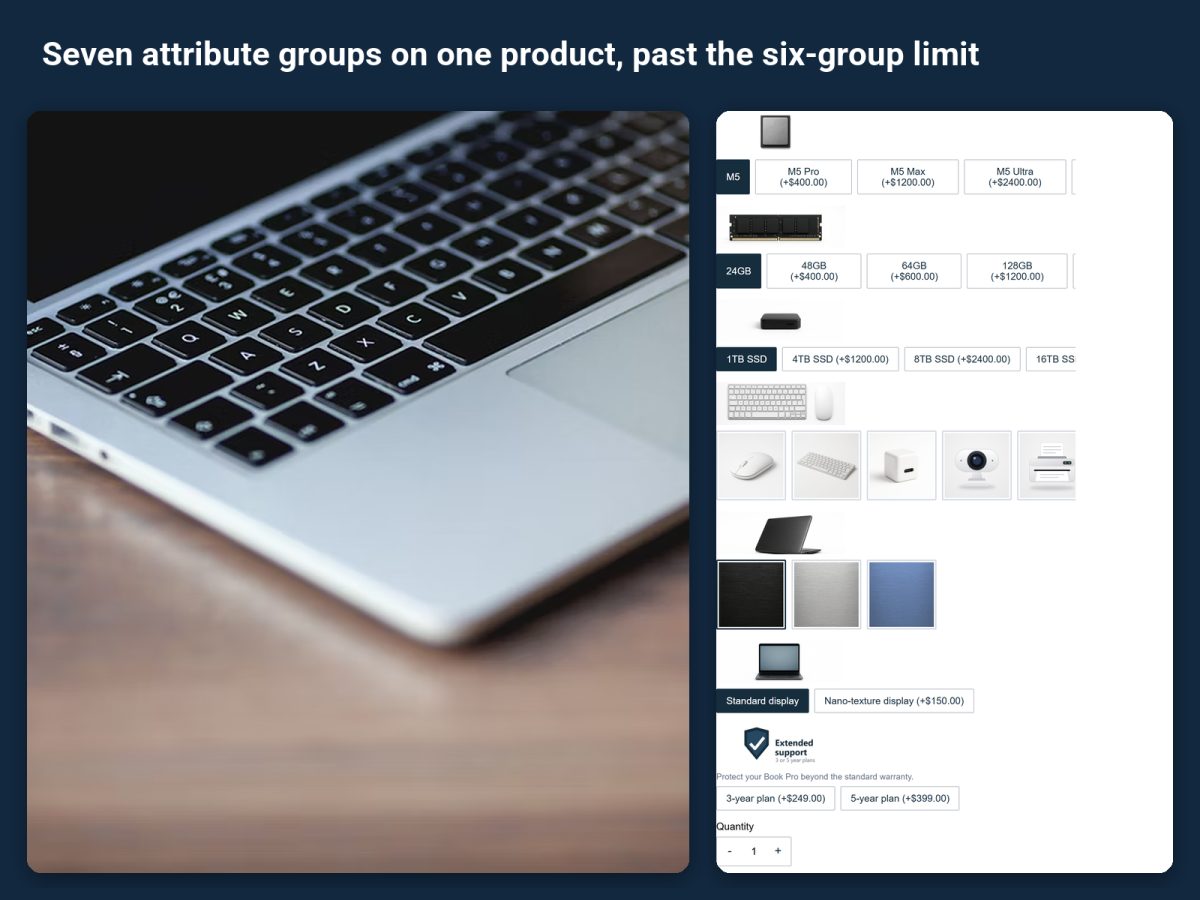
- More than 6 options on one product. Unlimited attribute groups, values and combinations. The custom laptop demo carries seven attribute groups, from chip to display.
- Bulk order grids. One quantity grid, priced per combination. The team tee takes a size-by-color grid with a minimum of 6 in total.
- Packs and builders that share stock with your Wix products. Options can draw stock from products you already sell, so a PC builder or a multi-pack works like a bundle. The underwear 5-pack takes each pair's stock from the regular products.
- Photos that change with the choice. Layered images redraw the product photo as shoppers choose. On the messenger bag, each panel's swatch recolors its part of the photo.
How to set it up
- Install from the Wix App Market. Install from the listing. The free plan includes one attribute set with up to three attribute groups, every input type, and assignment to unlimited products. Paid plans come with a 14-day trial.
- Start from a demo product. The app installs working demo products and has a step-by-step tour on every page, so you can see a finished setup before building your own.
- Build an attribute set. Add a group for each choice the product needs, pick how it displays, and give each value its price, SKU and stock where they differ. Connected groups price the whole combination; separated values price on their own.
- Make options conditional where they apply. A field that only matters after another choice stays hidden until that choice is made.
- Assign the set to products. The Basic plan assigns to products and categories; Advanced and Unlimited assign by customer group as well.
- Check the cart and checkout. Add the product with a few selections and confirm they show in the cart, at checkout and on the order. Every selection follows the order to the cart, checkout, emails and the order view.
Products this fits
Engraved gifts, printed apparel, furniture, PC builders, bundles and multi-packs, gift wrap, and add-ons. The app page shows the demo products.
Selling on Shopify too?
Attribute Wizard Pro for Shopify does the same past Shopify's 3-option, 2,048-variant limit.