own UPS, FedEx or DHL account on Wix: Should you use your own UPS, FedEx or DHL account on Wix?
The PoCo shipping apps rate with PoCo's carrier account or with yours. When to use your own UPS, FedEx or DHL account on Wix, what it changes at checkout and on labels, and how to start without one.
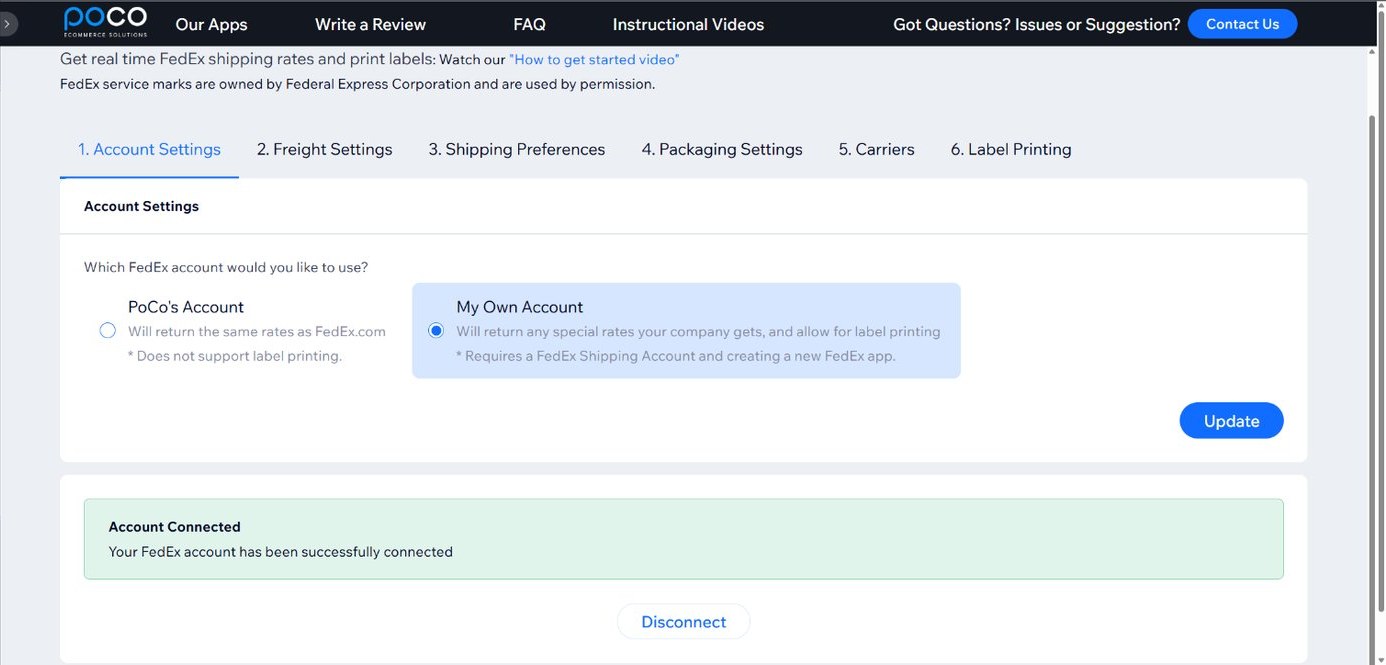
Each PoCo shipping app for Wix works with two kinds of carrier account: PoCo's, or your own UPS, FedEx or DHL account on Wix. The choice is made in the app, and it decides two things: which rates your shoppers see at checkout, and whether the app can create shipments and print labels, which happens on your own account only.
Start on PoCo's account
Install the app and rates show at checkout with no carrier setup on your side. As the UPS app page puts it: start on ours with no UPS setup. This is the quickest start, and the right one when you only need rates at checkout and do not have a carrier account yet, or have one without negotiated rates.
Connect your own account
With your own account connected, shoppers see your negotiated rates at checkout, and the app can create shipments and print labels from the order. Choose this when you already ship with the carrier on discounted rates, or when you want labels from the order. Here is how each listing describes it:
- UPS: "Use our UPS account for quick setup, or integrate your own UPS account to access your custom negotiated rates, and to generate shipments."
- FedEx: "Get started quickly with our FedEx account or connect your own to take advantage of your negotiated rates and generate shipments with ease."
- DHL: "Get started quickly with our DHL account or connect your own to take advantage of your negotiated rates and generate shipments with ease."
Which plan you need
Both plans of each app let you use PoCo's account or your own for the rates. Shipment generation and label printing are on the Shipping & Print Labels plan and need your own account; the Shipping Only plan shows rates at checkout. The plans and prices are on each app page: UPS, FedEx, DHL.
Setting it up
The account is chosen in the app, and the rest of the setup is the same either way: set flat-rate or weight-based pricing and define your boxes. The step-by-step guides are UPS, FedEx and DHL.
What store owners say
"I was very concerned about getting any kind of tech support from a third party app. Especially when communicating only thru email. However, I was pleasantly surprised when, not only did they respond promptly, the problem was quickly fixed." Blancteam, on the Wix App Market.